Automate Your Admin
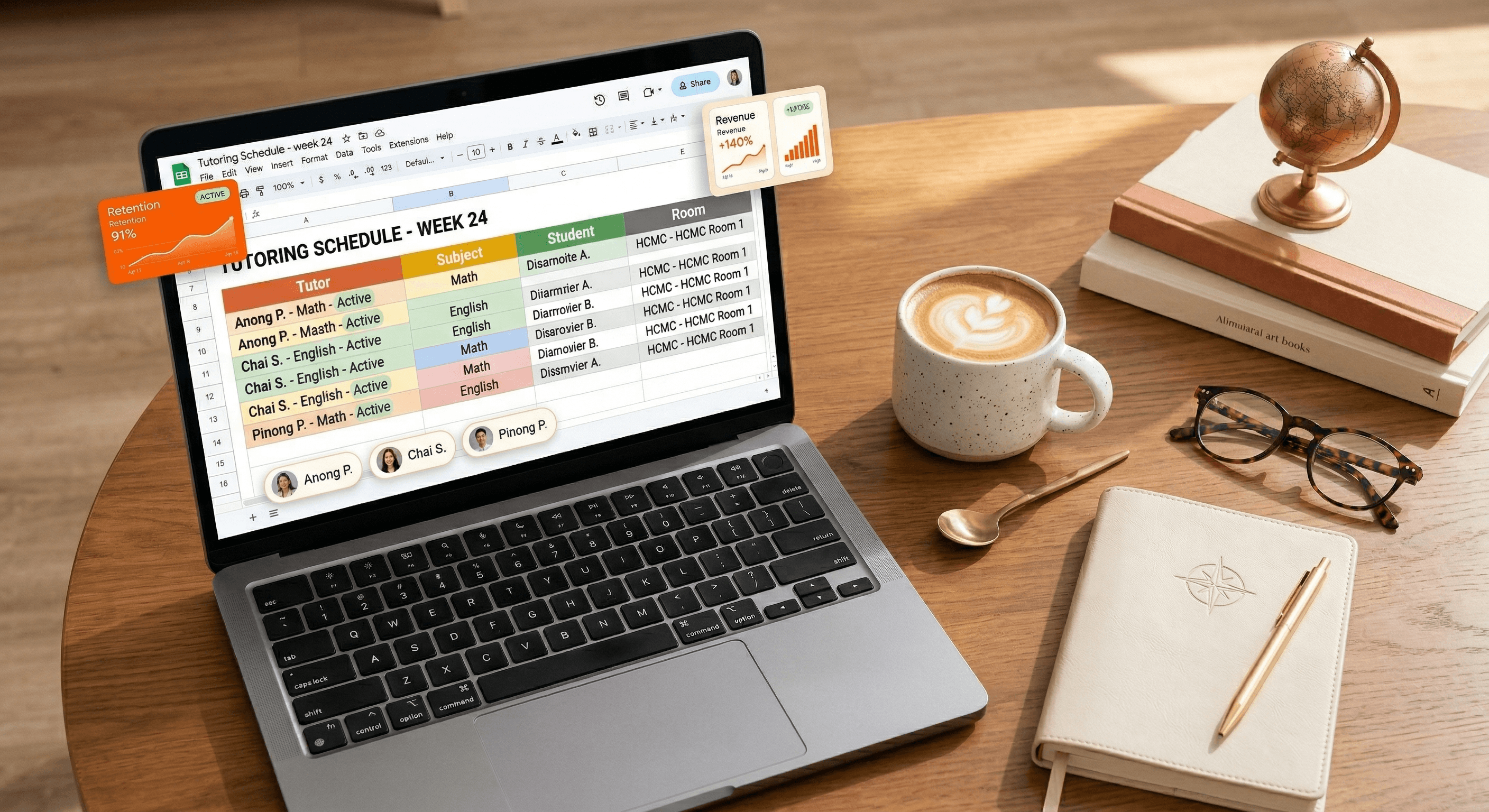
Scheduling is the heartbeat of any tutoring center. If your schedule is messy, your entire operation feels chaotic. Many owners in Southeast Asia start with Google Sheets because it’s free and flexible. In this guide, we’ll show you how to build a basic tutor schedule—and why you eventually need to move beyond it to truly grow.
Step-by-Step: Building Your Google Sheets Schedule
To create a functional (but manual) schedule, follow these steps:
Step 1: The Foundation. Create columns for "Tutor Name," "Student Name," "Subject," "Time Slot," and "Room/Link."
Step 2: Data Validation. Use 'Data Validation' to create drop-down menus for your tutors and subjects. This prevents typing errors that lead to scheduling conflicts.
Step 3: Conditional Formatting. Set up a rule to highlight duplicate tutor names in the same time slot. This is your "manual alarm" for double-booking.
The "Management Trap" of Manual Sheets
While Google Sheets is a great starting point, it has a "Growth Ceiling." Once you reach 30 students or 5 tutors, the manual workload explodes. You’ll find yourself at 2 AM fixing broken formulas or answering WhatsApp messages from parents asking, "What time is the class again?"
Why Manual Scheduling Kills Growth:
No Parent Access: Parents can't see the live schedule, leading to endless "status update" chats.
Version Control: If a tutor accidentally deletes a cell, your entire week is ruined.
Zero Automation: You still have to manually send reminders for every single class.
"A spreadsheet helps you organize the present; a system helps you automate the future."
The Solution: Automate Your Calendar
Why spend 5 hours a week on a spreadsheet when a system can do it in 5 seconds? Tutearn automates your tutor scheduling, alerts you to conflicts instantly, and gives parents their own branded portal to check times. Stop Managing. Start Growing. We migrate your manual schedule to our system for free.

FAQ
Q: Is Google Sheets secure for student data?
A: Not really. If you share the link incorrectly, anyone can see your student list and contact info. A dedicated system like Tutearn keeps your data encrypted and secure.
Q: Can Tutearn import my current Google Sheet?
A: Yes! Our team handles the data migration for you so you don't lose a single class record.



" height="26.775854982010287px" id="cApMGcL1n" transform="translate(8.075 0)" width="155.3056933182408px"/><path d="M 2.104 7.648 C 3.183 6.921 4.353 6.381 5.609 6.039 C 7.955 5.398 10.298 5.468 12.623 6.156 C 14.353 6.668 15.883 7.558 17.235 8.755 C 17.581 9.063 17.63 9.402 17.35 9.765 C 16.893 10.357 16.391 10.911 15.779 11.347 C 15.381 11.63 15.118 11.589 14.737 11.257 C 14.263 10.841 13.789 10.419 13.273 10.056 C 11.993 9.153 10.613 8.45 9.076 8.097 C 7.36 7.703 5.637 7.627 3.9 7.945 C 2.651 8.173 1.464 8.575 0.367 9.222 C 0.28 9.274 0.145 9.371 0 9.454 C 0.142 8.928 0.322 8.475 0.474 8.073 C 1.505 5.343 3.242 3.198 5.751 1.703 C 7.017 0.949 8.377 0.457 9.827 0.198 C 11.388 -0.083 12.938 -0.055 14.495 0.218 C 14.692 0.253 14.886 0.298 15.076 0.35 C 15.571 0.485 15.775 0.827 15.588 1.315 C 15.384 1.841 15.163 2.364 14.876 2.845 C 14.474 3.519 13.948 4.097 13.339 4.596 C 13.052 4.834 12.727 4.924 12.367 4.852 C 10.671 4.499 8.969 4.499 7.287 4.852 C 6.138 5.094 5.024 5.475 3.983 6.052 C 2.896 6.654 1.924 7.405 1.045 8.281 C 0.92 8.405 0.789 8.53 0.664 8.651" fill="rgb(242, 96, 21)" height="11.53514688908613px" id="vkqCGwQj4" transform="translate(15.185 3.587)" width="17.53137732008387px"/><path d="M 2.384 1.426 C 3.416 2.208 4.312 3.154 5.038 4.226 C 6.401 6.239 7.09 8.478 7.19 10.9 C 7.263 12.703 6.917 14.437 6.218 16.105 C 6.038 16.534 5.73 16.686 5.298 16.541 C 4.588 16.302 3.903 16.004 3.294 15.565 C 2.896 15.278 2.851 15.018 3.045 14.551 C 3.284 13.966 3.533 13.385 3.709 12.779 C 4.149 11.274 4.37 9.741 4.211 8.174 C 4.031 6.423 3.547 4.765 2.685 3.226 C 2.066 2.118 1.305 1.122 0.339 0.291 C 0.263 0.226 0.128 0.129 0 0.018 C 0.543 -0.017 1.031 0.008 1.46 0.018 C 4.377 0.115 6.969 1.063 9.194 2.956 C 10.315 3.911 11.222 5.039 11.934 6.329 C 12.703 7.717 13.177 9.195 13.419 10.755 C 13.45 10.952 13.467 11.15 13.481 11.35 C 13.512 11.862 13.253 12.167 12.734 12.146 C 12.173 12.125 11.602 12.08 11.055 11.966 C 10.287 11.804 9.571 11.492 8.903 11.077 C 8.585 10.88 8.395 10.603 8.35 10.236 C 8.135 8.52 7.588 6.904 6.706 5.43 C 6.104 4.423 5.384 3.489 4.502 2.689 C 3.581 1.855 2.557 1.177 1.443 0.627 C 1.284 0.547 1.125 0.468 0.969 0.385" fill="rgb(242, 96, 21)" height="16.594151459163477px" id="oS98wg0QL" transform="translate(19.663 12.784)" width="13.483612746338414px"/><path d="M 13.624 2.696 C 13.173 3.91 12.528 5.042 11.713 6.049 C 10.184 7.938 8.239 9.246 5.949 10.045 C 4.243 10.64 2.485 10.81 0.686 10.623 C 0.222 10.575 -0.013 10.325 0.001 9.869 C 0.025 9.121 0.108 8.381 0.354 7.668 C 0.513 7.204 0.748 7.087 1.253 7.135 C 1.879 7.194 2.513 7.263 3.139 7.256 C 4.707 7.242 6.239 7.007 7.693 6.398 C 9.316 5.716 10.762 4.775 11.987 3.502 C 12.866 2.585 13.599 1.571 14.111 0.405 C 14.153 0.315 14.205 0.156 14.274 0 C 14.464 0.509 14.586 0.986 14.696 1.398 C 15.451 4.218 15.295 6.972 14.129 9.651 C 13.541 11 12.724 12.194 11.696 13.253 C 10.592 14.391 9.316 15.274 7.893 15.959 C 7.713 16.045 7.53 16.121 7.343 16.19 C 6.862 16.37 6.495 16.211 6.364 15.706 C 6.222 15.163 6.098 14.606 6.049 14.045 C 5.98 13.263 6.073 12.488 6.274 11.727 C 6.371 11.367 6.578 11.104 6.918 10.952 C 8.499 10.249 9.883 9.256 11.042 7.986 C 11.831 7.118 12.516 6.159 13.025 5.083 C 13.558 3.959 13.907 2.782 14.111 1.557 C 14.139 1.381 14.174 1.208 14.205 1.031" fill="rgb(242, 96, 21)" height="16.261952576631565px" id="FYdJ1SJIt" transform="translate(7.004 17.203)" width="15.158266796182085px"/><path d="M 14.998 11.021 C 13.697 10.976 12.434 10.727 11.216 10.267 C 8.939 9.409 7.088 7.976 5.607 6.056 C 4.507 4.627 3.787 3.007 3.399 1.246 C 3.299 0.793 3.462 0.488 3.901 0.36 C 4.617 0.146 5.348 -0.007 6.102 0 C 6.59 0 6.777 0.191 6.891 0.685 C 7.033 1.301 7.168 1.921 7.372 2.516 C 7.88 3.997 8.586 5.377 9.621 6.568 C 10.777 7.893 12.13 8.969 13.721 9.73 C 14.867 10.277 16.06 10.651 17.33 10.772 C 17.431 10.782 17.597 10.782 17.766 10.8 C 17.344 11.142 16.929 11.405 16.573 11.64 C 14.137 13.246 11.472 13.966 8.562 13.703 C 7.095 13.571 5.704 13.17 4.375 12.53 C 2.95 11.841 1.707 10.907 0.607 9.772 C 0.469 9.63 0.337 9.478 0.213 9.322 C -0.109 8.921 -0.071 8.526 0.365 8.243 C 0.835 7.938 1.327 7.644 1.842 7.422 C 2.562 7.111 3.327 6.952 4.112 6.907 C 4.486 6.883 4.801 7 5.05 7.274 C 6.216 8.554 7.593 9.554 9.164 10.253 C 10.237 10.73 11.365 11.076 12.545 11.222 C 13.78 11.371 15.005 11.333 16.233 11.139 C 16.41 11.111 16.586 11.087 16.759 11.063" fill="rgb(242, 96, 21)" height="13.755802948807395px" id="o7Yeq9H5n" transform="translate(0 9.165)" width="17.76634845523122px"/></g></svg>)


