The Platform
for Learning Centers
Forget spreadsheets.
Focus on students.
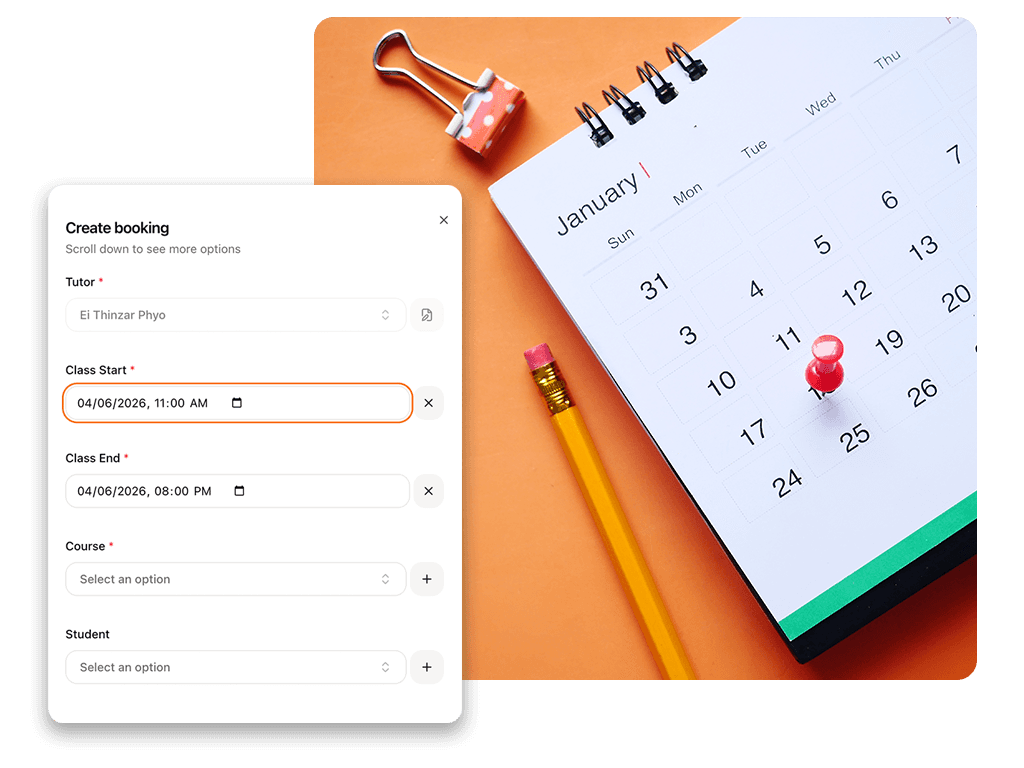
The Platform
for Learning Centers
Forget spreadsheets.
Focus on students.
Schedule
Tutor Scheduling Software: Centralized Class Management for Growing Centers
For high-volume learning centers with dozens of tutors and hundreds of students, coordination is a silent administrative bottleneck.
When your scheduling reliance stays stuck on group chats like WhatsApp, Zalo, or LINE, a single manual tracking mistake leads to missed classes. It creates immediate calendar conflicts and damages your institutional reputation.
Tutearn replaces the daily chat chaos with a single source of truth. Our platform translates tutor availability, automates class booking, and provides an organized calendar for your entire multi-branch organization.
The Operational Overhead of Chat-Based Scheduling
Managing appointment calendars on manual spreadsheets or paper planners becomes unmanageable as your center expands.
When you scale past 20 tutors, scheduling complications multiply rapidly:
The Availability Chase: Staff managers spend hours messaging tutors every week to confirm when they can teach.
Double-Booking Risks: Overlapping sessions occur easily when teachers handle multiple subjects across different physical branches.
Flipped Link Confusion: Students and instructors lose valuable learning time searching through old chat history for online class access links.
Tutearn removes these daily logistical issues by running your center on automated calendar logic.
Key Capabilities of the Scheduling Hub
1. Tutor-Led Availability Tracking
Give your teaching staff the autonomy to manage their own working hours while you maintain complete administrative control.
Self-Managed Work Windows: Tutors define their exact working hours directly within their private portal. Once a teacher marks a slot as open, it becomes instantly visible to your admin team for client assignment.
Real-Time Calendar Updates: Any adjustment made by a tutor reflects on the master administrator dashboard instantly, ensuring your staff never books an unapproved off-hours session.
Multi-Branch Syncing: Track instructor movement seamlessly across multiple locations or online classrooms without data duplication.
2. Conflict Protection Logic
Eliminate double-bookings at the software level, protecting your relationships with parents and teachers.
Overlapping Slot Blocks: The system checks calendar parameters instantly during the booking process. It stops staff from scheduling a teacher for two different sessions at the same time.
Wallet Balance Protection: The platform links student calendar bookings directly to their digital prepaid account balances. This automated barrier prevents unpaid or unverified classes from entering your active schedule.
Automated Status Visibility: View real-time availability grids that filter your staff by subject expertise, teaching tier, or branch location in seconds.
3. Recurring Class Schedules and Bulk Adjustments
Organize short-term intensive courses or multi-year school programs with a few simple clicks.
Automated Series Booking: Populate your entire student calendar weeks or months in advance. Set up your recurring class logic once, and let the software build out the future calendar grid.
Holiday Calendar Overrides: When national holidays or school breaks occur, admins can adjust individual sessions or shift an entire recurring class series without typing in manual edits line by line.
Instant Reschedule Workflows: Tutors can request session changes directly inside their portal. Once an admin approves the request, the system shifts the calendar entry and sends out a notification to the client.
4. Direct Session Entry and Link Integration
Deliver a professional digital experience that makes joining an online classroom simple for parents and teachers.
The Join Now Button: A prominent entry button appears on both the tutor and client dashboards exactly five minutes before a class is scheduled to begin.
Hard-Linked Classrooms: Connect every scheduled session directly to its unique Zoom, Google Meet, or ClassIn room link. Users access their specific digital classroom instantly without checking text messages or emails.
Attendance Automation Integration: The moment a class finishes, the system prompts the instructor to log student attendance, which links directly to your financial payout system.
The Outcome: Complete Administrative Freedom
Every hour your management team spends resolving scheduling conflicts, double-checking teacher text messages, or sending out classroom links is time lost to business expansion. Moving your operations to an automated system turns your center into an organized, scalable business.
When your calendar operates with total accuracy, your administrative workload drops significantly. You reclaim the time needed to open new branches, improve curriculum quality, and focus on high-level command.
Scheduling Operational FAQ
How does the platform prevent tutors from being double-booked?
The platform has built-in conflict protection logic. It runs an instant cross-check across all branch locations and subject assignments. The system blocks any overlapping session at the software level, making double-booking an instructor impossible.
Can we update the schedule for national holidays or sudden center closures?
Yes. Administrators have absolute control over the master calendar grid. You can block out specific holiday dates or center breaks in bulk, which cancels or pauses any recurring sessions scheduled during those times without affecting the rest of your term data.
How do students and teachers join their online video lessons?
Every class entry on the calendar holds its specific Zoom, Google Meet, or ClassIn link. Five minutes before the session starts, a button appears on the user dashboard. Both the student and the teacher click that button to enter the correct room directly.
Can parents or clients book their own classes through the app?
Yes. Depending on how you configure your center settings, you can allow clients to view available tutor time slots and book sessions themselves. The platform requires them to have a sufficient prepaid wallet balance before confirming any appointment.
Tutor Scheduling Software: Centralized Class Management for Growing Centers
For high-volume learning centers with dozens of tutors and hundreds of students, coordination is a silent administrative bottleneck.
When your scheduling reliance stays stuck on group chats like WhatsApp, Zalo, or LINE, a single manual tracking mistake leads to missed classes. It creates immediate calendar conflicts and damages your institutional reputation.
Tutearn replaces the daily chat chaos with a single source of truth. Our platform translates tutor availability, automates class booking, and provides an organized calendar for your entire multi-branch organization.
The Operational Overhead of Chat-Based Scheduling
Managing appointment calendars on manual spreadsheets or paper planners becomes unmanageable as your center expands.
When you scale past 20 tutors, scheduling complications multiply rapidly:
The Availability Chase: Staff managers spend hours messaging tutors every week to confirm when they can teach.
Double-Booking Risks: Overlapping sessions occur easily when teachers handle multiple subjects across different physical branches.
Flipped Link Confusion: Students and instructors lose valuable learning time searching through old chat history for online class access links.
Tutearn removes these daily logistical issues by running your center on automated calendar logic.
Key Capabilities of the Scheduling Hub
1. Tutor-Led Availability Tracking
Give your teaching staff the autonomy to manage their own working hours while you maintain complete administrative control.
Self-Managed Work Windows: Tutors define their exact working hours directly within their private portal. Once a teacher marks a slot as open, it becomes instantly visible to your admin team for client assignment.
Real-Time Calendar Updates: Any adjustment made by a tutor reflects on the master administrator dashboard instantly, ensuring your staff never books an unapproved off-hours session.
Multi-Branch Syncing: Track instructor movement seamlessly across multiple locations or online classrooms without data duplication.
2. Conflict Protection Logic
Eliminate double-bookings at the software level, protecting your relationships with parents and teachers.
Overlapping Slot Blocks: The system checks calendar parameters instantly during the booking process. It stops staff from scheduling a teacher for two different sessions at the same time.
Wallet Balance Protection: The platform links student calendar bookings directly to their digital prepaid account balances. This automated barrier prevents unpaid or unverified classes from entering your active schedule.
Automated Status Visibility: View real-time availability grids that filter your staff by subject expertise, teaching tier, or branch location in seconds.
3. Recurring Class Schedules and Bulk Adjustments
Organize short-term intensive courses or multi-year school programs with a few simple clicks.
Automated Series Booking: Populate your entire student calendar weeks or months in advance. Set up your recurring class logic once, and let the software build out the future calendar grid.
Holiday Calendar Overrides: When national holidays or school breaks occur, admins can adjust individual sessions or shift an entire recurring class series without typing in manual edits line by line.
Instant Reschedule Workflows: Tutors can request session changes directly inside their portal. Once an admin approves the request, the system shifts the calendar entry and sends out a notification to the client.
4. Direct Session Entry and Link Integration
Deliver a professional digital experience that makes joining an online classroom simple for parents and teachers.
The Join Now Button: A prominent entry button appears on both the tutor and client dashboards exactly five minutes before a class is scheduled to begin.
Hard-Linked Classrooms: Connect every scheduled session directly to its unique Zoom, Google Meet, or ClassIn room link. Users access their specific digital classroom instantly without checking text messages or emails.
Attendance Automation Integration: The moment a class finishes, the system prompts the instructor to log student attendance, which links directly to your financial payout system.
The Outcome: Complete Administrative Freedom
Every hour your management team spends resolving scheduling conflicts, double-checking teacher text messages, or sending out classroom links is time lost to business expansion. Moving your operations to an automated system turns your center into an organized, scalable business.
When your calendar operates with total accuracy, your administrative workload drops significantly. You reclaim the time needed to open new branches, improve curriculum quality, and focus on high-level command.
Scheduling Operational FAQ
How does the platform prevent tutors from being double-booked?
The platform has built-in conflict protection logic. It runs an instant cross-check across all branch locations and subject assignments. The system blocks any overlapping session at the software level, making double-booking an instructor impossible.
Can we update the schedule for national holidays or sudden center closures?
Yes. Administrators have absolute control over the master calendar grid. You can block out specific holiday dates or center breaks in bulk, which cancels or pauses any recurring sessions scheduled during those times without affecting the rest of your term data.
How do students and teachers join their online video lessons?
Every class entry on the calendar holds its specific Zoom, Google Meet, or ClassIn link. Five minutes before the session starts, a button appears on the user dashboard. Both the student and the teacher click that button to enter the correct room directly.
Can parents or clients book their own classes through the app?
Yes. Depending on how you configure your center settings, you can allow clients to view available tutor time slots and book sessions themselves. The platform requires them to have a sufficient prepaid wallet balance before confirming any appointment.
Simple Pricing That Pays for Itself
Simple Pricing That Pays for Itself
Simple Pricing That Pays for Itself
USD
PHP
THB
Monthly
1 Year
2 Years

Center
Up to 200 Students
$95
/month
Unlimited Branches
Unlimited Teachers
Multi Rate Payroll
Volume Scheduling
LMS
PDPA Compliance

Institution
Up to 2,000 students
$350
/month
Unlimited Branches
Unlimited Teachers
Multi Rate Payroll
Volume Scheduling
LMS
PDPA Compliance
White Label

Enterprise
Up to 20,000 students
$500
/month
Unlimited Branches
Unlimited Teachers
Multi Rate Payroll
Volume Scheduling
LMS
PDPA Compliance
White Label
Dedicated Support
Have more than 20,000 students? Please contact us for special rates
USD
PHP
THB
Monthly
1 Year
2 Years
Center
Up to 200 Students
$95
/month
Unlimited Branches
Unlimited Teachers
Multi Rate Payroll
Volume Scheduling
LMS
PDPA Compliance
Institution
Up to 2,000 students
$350
/month
Unlimited Branches
Unlimited Teachers
Multi Rate Payroll
Volume Scheduling
LMS
PDPA Compliance
White Label
Enterprise
Up to 20,000 students
$500
/month
Unlimited Branches
Unlimited Teachers
Multi Rate Payroll
Volume Scheduling
LMS
PDPA Compliance
White Label
Dedicated Support
Have more than 20,000 students?
Please contact us for special rates
"We used to spend 10–15 hours weekly on manual scheduling and payroll corrections. Now everything runs in one system — scheduling, payroll, and business report. Tutearn reduced admin work by over 60% even though we doubled our student base."
Zwe
CEO
Pace Forward Thailand

Get started
Register for a free business consultation
The Platform
for Learning Centers
Forget spreadsheets.
Focus on students.